
TL;DR: Zero Trust means no user, device, or system is automatically trusted, even inside your own network, so every request has to prove itself before it’s granted access.
Zero Trust shows up in almost every vendor pitch now, often attached to a product that has little to do with the actual model. Stripped of the marketing, Zero Trust is a specific security philosophy with concrete implications for how a business sets up access, monitors activity, and limits damage when something goes wrong. This guide explains what the term actually means, why the old approach to network security stopped working, and what adopting Zero Trust looks like in practice.
What Zero Trust Actually Means
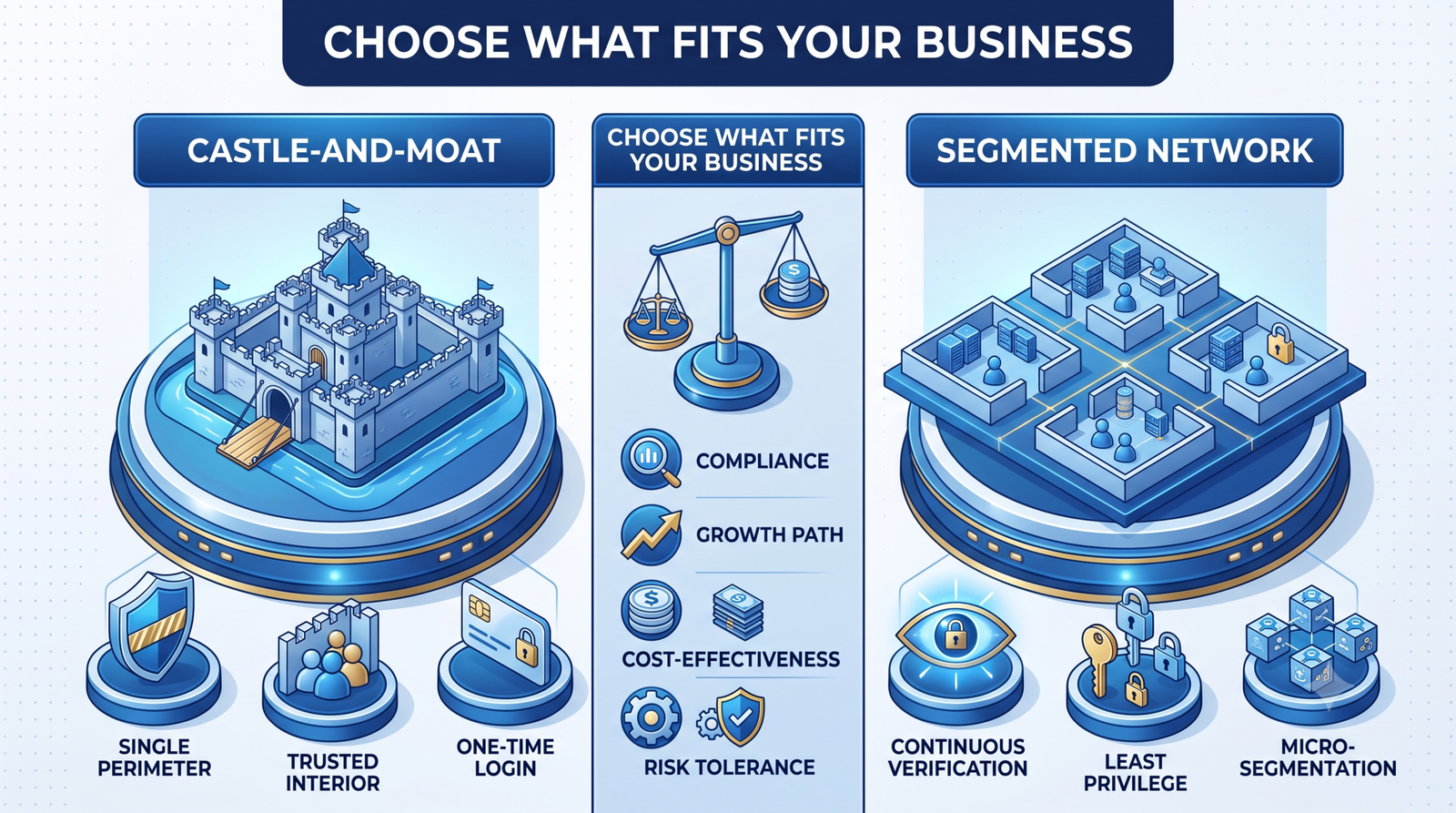
Zero Trust starts from a simple assumption: nothing inside your network gets trusted by default, not a device, not a user, not another internal system. Every request for access gets verified based on identity, device health, and context, regardless of whether the request comes from inside the office or from someone working remotely.
That’s a real shift from how most business networks were designed. It replaces a single checkpoint at the edge of the network with continuous verification at every layer.
Why the Traditional Security Perimeter No Longer Works
The older model, often called castle-and-moat, put strong defenses at the network’s edge and assumed anything that got past that edge could be trusted. That worked reasonably well when employees sat in one office on one network using company-owned hardware.
Remote work, cloud applications, and personal devices broke that assumption. Employees now access company systems from home networks, coffee shops, and personal phones, and much of the data they touch lives in cloud services outside the traditional perimeter entirely. Once an attacker gets past the edge of a castle-and-moat network, whether through a phished password or a compromised device, they often move freely because nothing inside is set up to question them.
The Core Principles of a Zero Trust Model
A handful of principles define Zero Trust in practice, and most implementations build toward all of them over time rather than all at once.
- Verify explicitly: every access request is authenticated and authorized based on all available signals,
not just a password. - Use least-privilege access: users and systems get only the access they need for their specific task,
not broad standing access. - Assume breach: systems are designed on the assumption that an attacker may already be inside,
which limits what any single compromised account can reach. - Segment the network: instead of one flat network, systems are divided into smaller zones so a
breach in one area doesn’t spread freely. - Monitor continuously: access and behavior are logged and reviewed on an ongoing basis rather than
checked once at login.
The Core Principles of a Zero Trust Model
A handful of principles define Zero Trust in practice, and most implementations build toward all of them over time rather than all at once.
What Zero Trust Looks Like in Practice
For most businesses, adopting Zero Trust doesn’t mean ripping out existing infrastructure. It means layering identity verification, device checks, and access controls onto systems that already exist. Multi-factor authentication, device compliance checks, and network segmentation through cloud service providers are common starting points, followed by tighter access policies across internal applications.
The goal isn’t to make employees jump through more hoops for no reason. It’s to make sure that if one account or device is compromised, the damage stays contained instead of spreading across the entire business.
Getting Started With Zero Trust
Most businesses start with an audit: who has access to what, whether that access matches what they actually need, and where the biggest gaps sit between current practice and Zero Trust principles. From there, enterprise software solutions teams typically prioritize identity and access management first, since it touches every other layer of the model.
If your business is still relying on a single perimeter and a shared sense of trust once someone is inside the network, talk to our security team for an assessment of where your current setup stands against a Zero Trust model.
FAQ
Is Zero Trust a specific product I can buy?
No. Zero Trust is a security model, not a single product. Vendors sell tools that support parts of it, such as identity management or network segmentation, but no single purchase makes a business Zero Trust on its own.
Does Zero Trust mean employees won’t trust each other?
No, it applies to systems and access requests, not to people personally. The model verifies devices and credentials at each request rather than assuming trust based on network location.
Is Zero Trust only for large enterprises?
No. Smaller businesses are frequent targets specifically because they often skip these controls. Core Zero Trust practices like multi-factor authentication and least-privilege access scale down just as well as they scale up.
How disruptive is it to implement?
Implementations are usually staged over months, starting with identity and access controls, so day-to-day operations continue with minimal disruption while protections are added layer by layer.
Trust Nothing by Default, Verify Everything
Zero Trust isn’t a trend businesses can afford to treat as marketing noise. It reflects a real change in how work happens, where data lives, and how attackers move once they gain a foothold. Businesses that build access and verification into every layer of their systems limit the damage a single mistake can cause. Businesses that rely on an old-style perimeter are betting that nothing ever gets past it.
Innosaber helps businesses assess their current security posture and build toward Zero Trust principles without disrupting daily operations. Contact us to start with a security assessment.